Task
Overview
A Timeplus Scheduled Task runs a historical query periodically according to its schedule and persists the query results to a target Timeplus native stream or external system (e.g., ClickHouse). When combined with Python UDFs, scheduled tasks can move data between external systems and Timeplus, or between different external systems.
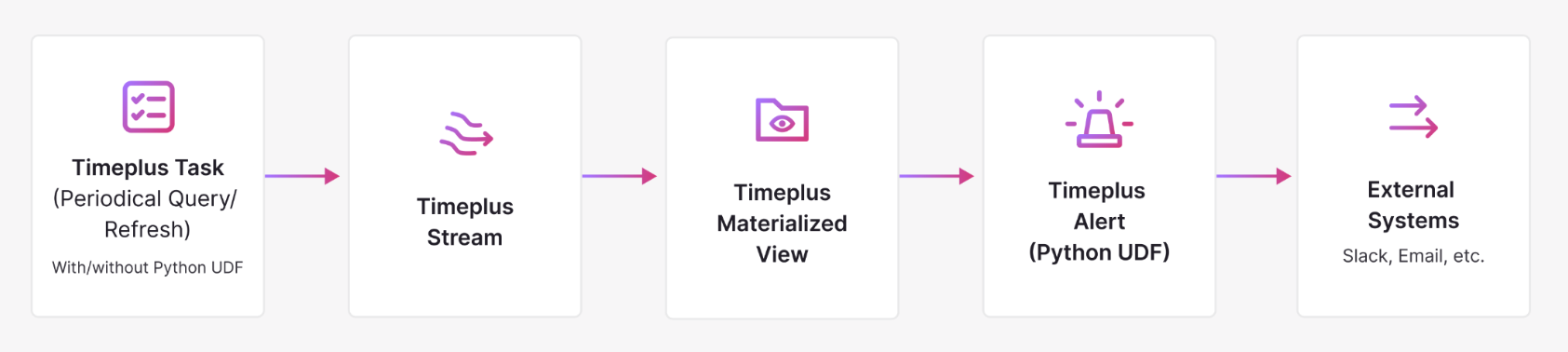
Scheduled tasks complement Timeplus Materialized Views which run streaming queries and continuously materialize results to target streams or external systems. Tasks are often used in combination with Alerts and Materialized Views to form a complete, automated data pipeline, as illustrated below:
Create Task
CREATE OR REPLACE TASK <task_name>
SCHEDULE <interval>
TIMEOUT <interval>
INTO <target_stream>
AS
  <Historical SELECT query>;
SCHEDULE interval
The interval at which the task runs. Tasks are scheduled via a centralized scheduler to prevent overlap: the next run starts only after the previous run completes.
TIMEOUT interval
The maximum allowed execution time for the task. If the task exceeds this interval, the scheduler aborts it to prevent indefinite execution
Once created, a task is automatically scheduled in the Timeplus cluster. The scheduler selects the best candidate node in the cluster to execute the task.
Example
To periodically collect the Timeplus node statuses and persist the results into a target stream:
-- Create a target stream to hold the task results
CREATE STREAM node_states (cluster_id string, node_id string, node_state string);

-- Create a task to collect the node statuses
CREATE TASK refresh_node_states
SCHEDULE 5s
TIMEOUT 2s
INTO node_states
AS
  SELECT cluster_id, node_id, node_state FROM system.cluster;
The node_states stream will be populated every 5 seconds with the current status of cluster nodes.
List Tasks
-- List all tasks
SHOW TASKS;
Show Task
-- Show DDL definition of a task
SHOW CREATE TASK <db.task_name>;
Drop Task
DROP TASK <db.task_name>;
Pause Task
SYSTEM PAUSE TASK <db.task_name>;
Resume Task
SYSTEM RESUME TASK <db.task_name>;