Inputs
Overview
Compared to Timeplus external streams and external tables, Timeplus Inputs provide a different way to ingest data into the platform for real-time processing. An input is a long-running TCP, UDP, HTTP, or gRPC server that waits for external clients to connect and continuously push data to it.
Timeplus Inputs are designed to integrate seamlessly with the existing data ecosystem and collection tools. This allows users to reuse what they already have to send data into Timeplus. For example, the Splunk S2S input enables Splunk users to forward events directly to Timeplus by simply configuring their Splunk forwarders to point to the Splunk S2S input endpoint.
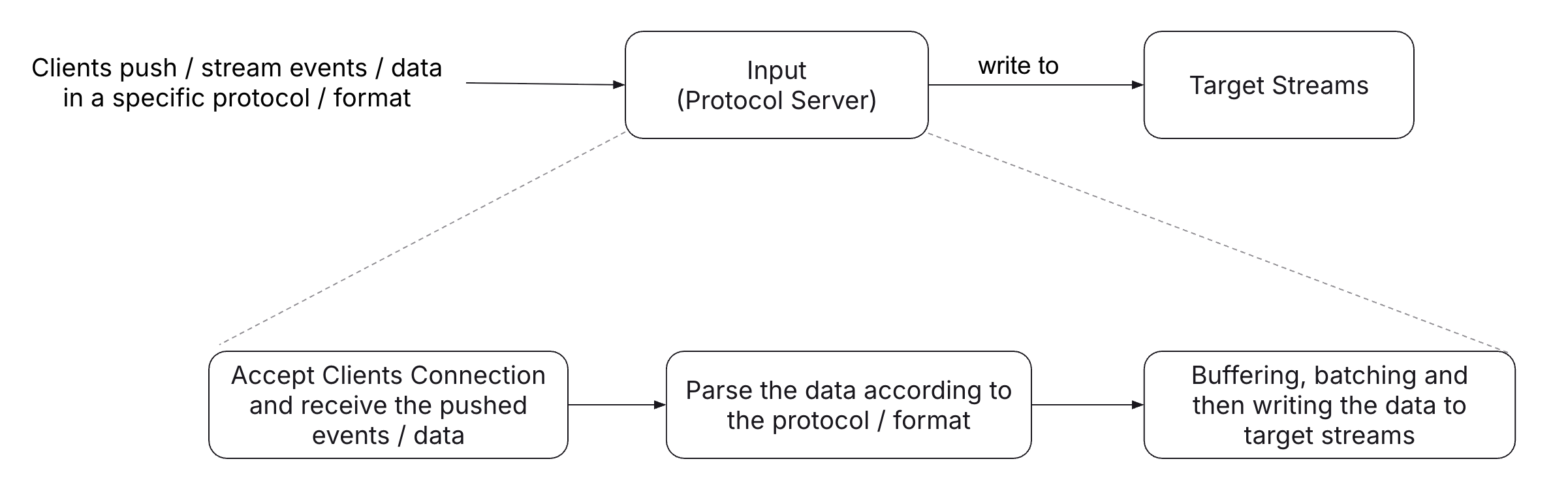
Once created, each input runs a specific protocol server and is bound to one or more target Timeplus streams. These streams store the incoming data after protocol-level parsing and effectively act as a high-performance, persistent, and streaming-queryable buffer for incoming events thanks to Timeplus dural storage design. Users can then apply further pipeline processing — such as streaming ETL, joins, and aggregations—on top of these target streams.
The following diagram illustrates the high-level components of a Timeplus Input.
General Input Creation Syntax
-- Create a target stream to hold the incoming data
CREATE STREAM <target_stream_name> (...) SETTINGS ...;

-- Create the input and use the target stream to hold the incoming data
CREATE INPUT <input_name>
SETTINGS
  type=<input_type>,
  target_stream=<target_stream_name>,
  tcp_port=<bind_tcp_port>,
  listen_host=<listen_host>,
  ...other input-type-specific settings...
COMMENT '<comments>'
Settings
type: The input type, which defines the protocol the input server speaks. Supported values includesplunk-s2s,splunk-hec,datadog,elastic,otel,netflow, andsyslog.target_stream: The name of the target stream that stores incoming data after protocol parsing.tcp_port: The TCP port on which the input server listens for incoming connections.
In some cases, users may want to use the target stream purely as a persistent queue or buffering layer. In this scenario, historical data storage can be disabled for the target stream to reduce storage overhead.
For example:
CREATE STREAM <target_stream_name> (...)
SETTINGS storage_type = 'streaming';
Timeplus Enterprise users can also provision inputs through Timeplus Console, which provides an intuitive, guided workflow for input configuration.
Once data is pushed into the input, users can query the target stream in real time using streaming queries, or build Materialized View pipelines on top of it for further processing.